
How to Use Whoer IP for IP Checks: A Step-by-Step Guide
Discover how to use Whoer.net to check and verify your IP address. Explore top alternatives for comprehensive IP management .
Apr 2, 2026



Practical job scraping guide for recruiters, analysts, and dev teams — discovery, extraction, proxies, normalization, and compliance.
Job scraping, also known as web scraping for job postings, involves automating the extraction of job listings from websites like Indeed, LinkedIn, or company career pages. It's not just about collecting data—it's about turning raw information into actionable insights. It’s a disciplined data project: discover relevant sources, choose the right extraction approach, normalize noisy fields (location, salary), avoid blocks, and keep data clean and lawful.
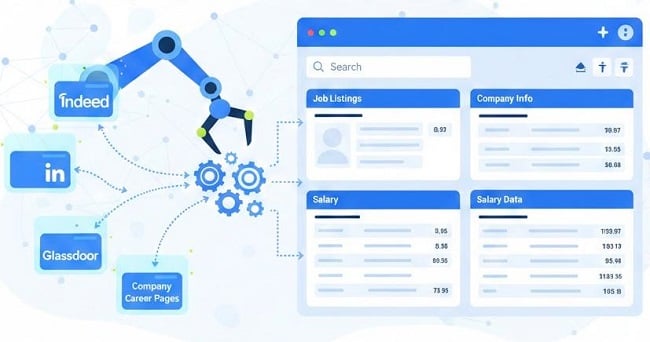
In this guide, we'll address common concerns like anti-bot measures and data freshness, break it down into practical steps from proof-of-concept to production feeds, and explain trade-offs for different user needs.
Here are typical scenarios:
Personal Job Hunting: Tired of manually browsing? Scraping aggregates listings tailored to your skills, locations, or salary—saving hours weekly.
Recruitment and HR: Monitor competitor hiring, analyze trends (e.g., AI skills demand), or build candidate databases.
Building Job Boards or Apps: Create niche aggregators (e.g., remote tech jobs) or track economic indicators like industry job growth.
Market Research: Gain insights on salary benchmarks or emerging titles, but worry about accuracy and freshness.
Data Science/Research: Assemble datasets for analysis, focusing on reproducibility and clean schemas.
Common needs include:
Recruiters/Sourcers: Build lead lists, enrich contacts, deduplicate, exclude agencies.
Analysts: Broad coverage, timestamped data, normalized locations/categories.
Startups/Job Boards: Robust deduplication, near real-time updates, scalability.
Data Scientists: Labeled datasets, metadata.
Non-Developers/Sales: Quick no-code tools.
Your approach depends on scale, skills, and risk.
Not legal advice. Laws and court rulings evolve and outcomes depend on jurisdictions and facts. This guide summarizes common considerations; do not treat it as legal counsel.
Practical safeguards:
If your project targets login-protected or high-risk sites (e.g., LinkedIn, private dashboards), seek legal advice and prefer licensed data providers when possible.
Choose based on your scenario—e.g., recruiters pick no-code for speed:
| Scale / Skill | Recommended approach | Pros | Cons |
| Small / One-off / No-dev | No-code actors (Apify, eGrabber, Thunderbit) | Fast setup, export CSV/JSON | Less control, recurring fees |
| Prototype / Learning | Custom scripts (requests + BeautifulSoup / Playwright) | Cheap, flexible, fully custom | Maintenance overhead |
| Scale / Reliability / Compliance | Managed APIs / Datasets + proxies | Compliant, robust, scalable | Recurring cost (can be high) |
Cost hint: hobby/self-run ≈ $0 + dev time; starter paid actors ≈ $0–$50/mo; production (proxies + managed APIs) ≈ $100–$2,000+/mo depending on volume.
1. Recruiter (No-Code, Low Tech)
Use Apify / Thunderbit actor → daily run → export CSV → enrich contacts (legal check).
Time: 30–60 minutes to set up.
2. Analyst (Prototype, Medium Tech)
Build requests + BS4 prototype → normalize location & salary → weekly batch → dashboard.
Time: 2–4 hours to prototype.
3. Data Engineering (Production, High Tech)
Scrapy spiders + Playwright fallback → Airflow orchestration → Postgres + Elasticsearch → Prometheus monitoring → residential proxies if needed.
Time: days to build; ongoing maintenance.
Get usable job data in 10–30 minutes with zero code.
1. Sign up with a reputable provider.
2. Pick a job-board actor (e.g., Indeed actor / Generic Job Board).
3. Example actor input:
{
"actor": "generic-job-board",
"inputs": {
"query": "data engineer",
"location": "San Francisco, CA",
"maxPages": 5,
"outputFormat": "csv"
},
"schedule": "daily@02:00"
}
4. Run the actor → Export CSV / JSON → Open in Google Sheets.
5. (Optional) Enrich contacts with an enrichment tool (eGrabber/Hunter) only if compliant with privacy rules.
Check actor options for normalize_location, dedupe, geocode.
Use webhook/S3 exports to integrate outputs with downstream tools.
If actor returns many parse errors, try another actor or contact provider support.
You don’t need heavy custom normalization, fuzzy dedupe, or behind-login pages.
Identify high-value sources and group them so you write fewer scrapers.
Company career pages (usually reliable).
Major boards (Indeed, Glassdoor).
Shared ATS platforms (Workday, Greenhouse, Lever, BambooHR) — one template can cover many employers.
site: Google queries (e.g., site:company.com careers OR jobs).
SERP APIs for programmatic discovery.
Common Crawl queries for host patterns (e.g., bamboohr.com/jobs/).
Curated lists + seed crawling from job board landing pages.
Recognize patterns like *.workday.com, jobs.greenhouse.io, jobs.lever.co and build templates per ATS.
Business value (how many relevant roles).
Freshness (posting frequency).
Difficulty (anti-bot protections, login).
Coverage (how many target companies use that ATS).
List 5–10 candidate sources.
Mark ATS/vendor for each source.
Note posting frequency (daily/weekly/monthly).
Mark anti-bot risk (Low/Medium/High).
Choose 3 pilot sources to prototype
Build a minimal extractor to validate schema and feasibility.
Python + requests + beautifulsoup4 for static pages.
Playwright for JS/infinite scroll.
pandas for CSV output
Extract the canonical fields: title, company, location, date_posted, job_url.
Save a few records’ raw_html for debugging.
Flag pages needing login/CAPTCHA.
Setup (one terminal)
python -m venv venv
# macOS / Linux
source venv/bin/activate
pip install requests beautifulsoup4 pandas playwright
playwright install
Static HTML extraction (requests + BeautifulSoup) — save as prototype_bs4.py:
import requests
from bs4 import BeautifulSoup
import pandas as pd
url = "https://example-jobboard.com/search?q=data+engineer"
r = requests.get(url, headers={"User-Agent":"Mozilla/5.0"})
soup = BeautifulSoup(r.text, "html.parser")
jobs = []
for card in soup.select(".job-card"):
jobs.append({
"title": card.select_one(".title").get_text(strip=True),
"company": card.select_one(".company").get_text(strip=True),
"location": card.select_one(".location").get_text(strip=True),
"url": card.select_one("a")["href"]
})
pd.DataFrame(jobs).to_csv("jobs.csv", index=False)
Dynamic pages (Playwright) — save as prototype_playwright.py:
from playwright.sync_api import sync_playwright
import csv
def scrape(url):
rows = []
with sync_playwright() as p:
browser = p.chromium.launch(headless=True)
page = browser.new_page()
page.goto(url, timeout=60000)
page.wait_for_selector(".job-card", timeout=20000)
cards = page.query_selector_all(".job-card")
for c in cards:
title = c.query_selector(".title").inner_text().strip() if c.query_selector(".title") else ""
company = c.query_selector(".company").inner_text().strip() if c.query_selector(".company") else ""
location = c.query_selector(".location").inner_text().strip() if c.query_selector(".location") else ""
link = c.query_selector("a").get_attribute("href") if c.query_selector("a") else ""
rows.append([title, company, location, link])
browser.close()
with open("jobs_playwright.csv","w",newline="",encoding="utf-8") as f:
writer = csv.writer(f)
writer.writerow(["title","company","location","url"])
writer.writerows(rows)
if __name__ == "__main__":
scrape("https://example-jobboard.com/search?q=data")
After prototype success:
Cluster scrapers by ATS templates.
Choose proxy strategy (datacenter vs residential). Tip: Once you move beyond small tests, IP-based blocking becomes the most common failure point thus rotating proxies become necessary.
Plan schedules per source (daily for high churn, weekly for company pages).
Implement monitoring: parse_success_rate, 429_rate, new_jobs_per_day.
Select storage: Postgres + Elasticsearch (medium) or Parquet/S3 (large).
When to move from no-code to code:
You need custom normalization or fuzzy dedupe.
You must integrate into internal infra (Prometheus, Kafka).
Targets require login access or advanced anti-bot solutions.
1. schema.org / JSON-LD (JobPosting) — structured, preferred.
2. ATS templates — one template per vendor saves work.
3. CSS/XPath selectors — site specific.
4. LLM-assisted selector generation — generate candidates, validate on samples.
Use SERP/Google/ Common Crawl for seed URLs.
For infinite scroll, simulate scroll in Playwright or call backend API endpoints.
Datacenter proxies: fast, lower cost — use when allowed.
Residential proxies: more resilient vs anti-bot and geo testing — higher cost.
For production scraping, a managed rotating proxy IP service (with IP rotation and geo-targeting) can significantly reduce 429 errors and CAPTCHA frequency, like GoProxy.
Jittered delays: sleep(base + random()*jitter).
Exponential backoff for 429 responses: wait = min(2**retry, max_wait) + jitter.
Rotate UA and proxies per request; monitor proxy health and retire failing IPs.
Use Playwright stealth plugins or headful profiles to reduce headless footprint.
Avoid large-scale CAPTCHA solving unless you have explicit legal/contractual clearance.
For behind-login content, prefer partner APIs or explicit permission.
Ethical/legal note: bypassing access controls can carry legal risk. Consult counsel if in doubt.
job_id, site, title, company, location_city, location_state, location_country,
lat, lng, date_posted, date_scraped, salary_min, salary_max, salary_currency,
job_type, description, is_remote, url, raw_html
Geocode (Mapbox/Google/Nominatim) → city/state/country + lat/lng.
Keep raw and normalized values.
Numeric range regex:
(\$?\d{1,3}(?:,\d{3})*(?:\.\d+)?)\s*(?:-|to)\s*(\$?\d{1,3}(?:,\d{3})*(?:\.\d+)?)
Handle from, up to, per hour. Convert to annual with clear assumptions only.
import hashlib, re
def normalize(s):
return re.sub(r'\s+',' ', re.sub(r'[^\w\s]','', s.lower())).strip()
def canonical_key(company, title, location):
key = normalize(company) + "::" + normalize(title) + "::" + normalize(location)
return hashlib.sha256(key.encode('utf-8')).hexdigest()
Store canonical_key + date_scraped. Treat the same key within 30 days as a repost.
Use fuzzy matching (Levenshtein) threshold ≥ 0.85 to detect near duplicates.
Add company domain, LinkedIn id, hiring manager contact via vetted vendors — only when compliant with privacy laws.
Small: CSV / SQLite.
Medium: Postgres + Elasticsearch.
Large: Parquet in S3 + data platform pipelines.
Cron for simple jobs. Airflow/Prefect for complex DAGs.
parse_success_rate < 95% (24h) → alert.
http_429_rate > 5% (1h) → alert.
captcha_rate > 1% → alert.
new_jobs_per_day drop > 40% vs 7-day avg → alert.
avg_latency increase > 200% vs baseline → alert.
Cluster by ATS/vendor to minimize maintenance (one template for Workday, Lever, etc.).
Change detection: run daily synthetic checks against saved canonical pages; if parse success drops, open a maintenance ticket.
Selector re-generation: propose XPaths with an LLM or heuristics, then require human validation before deployment.
CI for spiders: run weekly canonical tests against sample pages.
Many 429s / blocked → rotate proxies, increase jitter/backoff.
Missing fields after site change → compare new raw_html to sample; roll back selectors; open maintenance ticket.
Duplicate postings → canonical_key + fuzzy matching.
Salary parsing fails → expand regex patterns and handle word ranges.
Detect language with langdetect library; use local geocoders for region specifics.
Normalize character encodings (UTF-8) and date formats (ISO 8601).
For non-web native sources (video, social), prefer APIs or vendor feeds; web scraping is less reliable there.
Use LLMs (Grok/GPT) for:
Compliance: log AI usage where required by local transparency rules. Validate LLM outputs before production. Track cost per prompt and total usage.
Q: Is scraping LinkedIn allowed?
A: LinkedIn has pursued legal action against some scrapers; scraping login-protected pages increases legal risk. Consult counsel.
Q: How often to rescrape a site?
A: High-churn boards: daily. Company career pages: weekly. Low-activity sites: monthly.
Q: How to geo-filter jobs?
A: Normalize locations to lat/lng and filter by radius using Haversine distance.
Job scraping empowers you to harness data for smarter decisions. By following these steps, you'll avoid pitfalls and achieve results. Remember, practice ethically—start with public, allowed sites. If you're scaling, consider professional services.
< Previous
Next >


 Cancel anytime No credit card required