
Python Web Scraping for Beginners: Complete Step-by-Step Guide (2026)
Learn Python internet scraping step by step, from HTML basics and BeautifulSoup to pagination, data cleaning, dynamic JavaScript pages, and common beginner mistakes.
Apr 9, 2026



Compare LangChain and LangGraph for LLM apps: scenarios, decision checklist, runnable example, and short migration summary.
In AI development, building applications with large language models (LLMs) often boils down to selecting frameworks that simplify orchestration, integration, and control. If you're a beginner, choosing between LangChain and LangGraph is a common dilemma. This beginner-friendly guide explains the differences, helps you decide which to learn or use, provides decision scenarios, code examples, and a short migration summary.
How to use this guide:
Start with LangChain for fast prototypes and predictable pipelines (retrieval → prompt → response).
Use LangGraph when you need durable sessions, branching/loops, human approvals, retries, or multi-agent coordination.
Production tip: keep model/tool code modular (LangChain style) and orchestrate complex flows with LangGraph only where persistent state and control are required.
1. Read the Definitions to map terms.
2. Read Decision Scenarios to pick the right approach.
3. Run the Runnable Example to see how the code is structured.
1. Core concepts: LLMs, prompts, chains vs nodes (1–2 days).
2. LangChain basics: prompts, chains, vector retrieval, memory — build a small FAQ or summarizer (1–2 weeks).
3. LangGraph basics: nodes, typed State, checkpoints; convert a tiny app (1 week).
4. Hybrid & production: observability, retries, tests, budgets — ongoing.
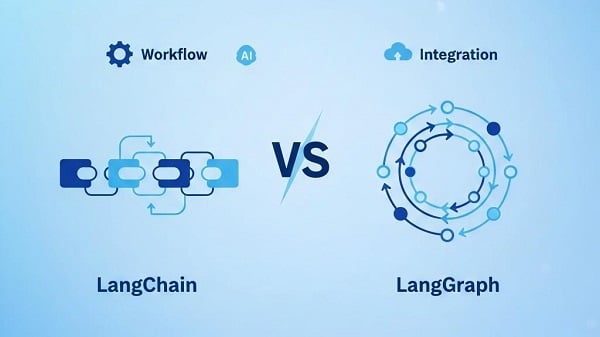
If you're new to AI workflows, LangChain(the linear toolkit) is your starting point. It's a modular toolkit for sequential or DAG-style pipelines, perfect for quick LLM apps.
v1.0 (October 2025) adds middleware for customizations like PII redaction and content blocks for structured outputs.
As projects grow, LangGraph(the graph orchestrator) takes over. It's a graph-based runtime for explicit state, checkpoints, loops, and branching—ideal for resilient workflows.
v1.0 introduces functional APIs (less OOP needed) and subgraphs for nested modularity.
Visualize the difference:
LangChain: Input → Retrieve → Prompt → Output (Linear Chain)
LangGraph: Input → Node1 (Retrieve) → Conditional Edge (If error, retry) → Node2 (Prompt) → Output (Graph with Loops)
| Dimension | LangChain | LangGraph |
| Flow model | Chains / pipelines (linear or DAG-like) | Nodes & edges (graphs with cycles/loops) |
| State | Mostly ephemeral/local | Centralized typed State, persisted via checkpoints |
| Control flow | Limited branching | Full conditional logic, retries, loops, subgraphs |
| Human-in-loop | Possible but ad-hoc | First-class pause/inspect/resume checkpoints |
| Learning curve | Lower; fast prototyping | Higher; more design & often helpful OOP |
| Best fit | RAG, summarization, single-agent apps, MVPs | Long-running agents, durable automations, multi-agent flows |
Quick MVP (e.g., FAQ bot, summarizer).
Predictable, stateless workflows.
Fast iteration with minimal setup.
Durable sessions surviving restarts.
Branching, loops, retries, or approvals.
Multi-agent coordination sharing state.
Use LangChain for LLM calls/embeddings; LangGraph to orchestrate retries/approvals.
1. Quick MVP / prototype (FAQ bot, summarizer)
Pick: LangChain — minimal setup and fast iteration.
2. Support assistant with persistent conversations & approvals
Pick: LangGraph (or hybrid) — persist sessions, checkpoint for reviews, resume later.
3. Multi-agent orchestration (researcher → verifier → responder)
Pick: LangGraph (hybrid) — easy coordination, retries, and controlled handoffs.
4. Batch ETL / large-scale transforms
Pick: LangChain — linear and cost-efficient for bulk jobs.
5. Not sure / learning both
Pick: Start with LangChain; design components modularly so they’re reusable if you later use a graph runtime.
Beginner tip: If you only want to learn one thing first, learn LangChain basics — prompts, chains, and retrieval teach core LLM patterns quickly.
1. Python basics — functions, dicts, and I/O.
2. Run the runnable toy — no installs, see state + nodes.
3. Componentize — extract pure functions (LLM wrapper, retrieve_docs).
4. Build a small LangChain-style app — a summarizer or FAQ using prompt templates + vector lookup.
5. Add tests & mocks — unit-test functions with mocked LLM/vector store.
6. Learn graph basics & refactor a flow — typed State, nodes, simple orchestration.
7. Hybrid experiment — add one checkpoint for a human approval stage and test resume logic.
This small script demonstrates the shape of a workflow: small functions (nodes) that read/write a single state object. Save as toy_nodes.py and run python toy_nodes.py.
# toy_nodes.py — runnable locally
def mock_llm(prompt: str) -> str:
return "LLM reply: " + prompt
def retrieve_docs(query: str) -> list:
return [f"Doc about {query} - A", f"Doc about {query} - B"]
def node_retrieve(state: dict) -> dict:
state["docs"] = retrieve_docs(state["query"])
return state
def node_answer(state: dict) -> dict:
prompt = f"Use {state['docs']} to answer: {state['query']}"
state["answer"] = mock_llm(prompt)
return state
if __name__ == "__main__":
state = {"query": "reset my password", "docs": [], "answer": ""}
state = node_retrieve(state)
state = node_answer(state)
print("Final state:", state)
Why this helps:
No installs needed — you can run and modify it.
Demonstrates separation of concerns: retrieval, answering, and an explicit state.
Make small changes (simulate errors, add retries) to see how flows evolve.
# Conceptual mapping (check official docs for APIs)
docs = vector_store.search(query)
prompt = prompt_template.format(docs=docs, query=query)
answer = llm.generate(prompt)
Use LangChain prompt templates and chain helpers to compose these steps.
# Conceptual mapping (check runtime docs)
graph.add_node("retrieve", node_retrieve)
graph.add_node("answer", node_answer)
graph.add_edge("retrieve", "answer")
graph.run({"query": "reset my password"})
LangGraph registers nodes and orchestrates them, persists State at checkpoints, and can resume runs.
1. Replace mocks with real clients and wrap calls (retry/backoff helper).
2. Prompts in templates (store and version prompts).
3. Keep node functions pure so they are easy to unit-test.
4. Add unit tests + an integration test with deterministic mocks.
5. Instrument logs: node entry/exit and small redacted state diffs.
6. Add cost/safety guards: state["llm_call_count"], state["iteration_count"].
7. Design a minimal typed State schema and document it.
8. If adding checkpoints ensure idempotence or guard side-effects.
9. Pin dependencies and add CI tests.
10. Staging & monitoring: replay resume scenarios and monitor LLM usage.
Example retry wrapper
import time
def call_with_retries(fn, *args, retries=3, backoff=1, **kwargs):
for i in range(retries):
try:
return fn(*args, **kwargs)
except Exception:
if i == retries - 1:
raise
time.sleep(backoff * (2 ** i))
Example pytest skeleton
def test_retrieve_docs(monkeypatch):
monkeypatch.setattr("myapp.nodes.vector_store.search", lambda q: ["docA"])
assert retrieve_docs("q") == ["docA"]
If you outgrow LangChain and need LangGraph features, here are the essentials:
1. Extract pure building blocks for LLM, retrieval, and tools.
2. Design a minimal typed State with only the fields you must persist.
3. Map chain steps → node(state): each step becomes def node(state): ...; return state.
4. Add checkpoints at human approvals or long waits.
5. Instrument & test: structured logs, unit tests, and replay tests from checkpoints.
Beginner tip: Keep the migration plan simple — convert only the flows that truly need persistence.
1. Over-graphing too early: only adopt LangGraph when you need state or branching.
Fix: Start with a chain and refactor one flow at a time.
2. Unbounded loops / cost spikes: loops calling LLMs can be expensive.
Fix: Add loop caps and track LLM call counts.
3. Tight coupling: mixing orchestration and business logic makes tests hard.
Fix: Keep node functions pure and small.
4. Poor observability: insufficient logs make debugging painful.
Fix: Log node entry/exit and small, redacted state diffs.
Minimal typed State and checkpoint strategy.
Idempotent nodes or safe resume logic.
Retries and backoff for external calls; loop caps.
Structured logging & checkpoint snapshots (redact PII).
Unit tests for nodes; replay/resume tests for checkpoints.
LLM call budget monitoring & alerts.
Pro Tip: If your agent fetches data from many external websites at scale, network-level routing (such as IP rotation) can become relevant for access stability and reliability.
Q: Are they mutually exclusive?
No — they complement each other. Use LangChain components inside LangGraph nodes when you need orchestration.
Q: Do I need OOP for LangGraph?
Not strictly; classes and typed structures often improve clarity for complex state, but functional styles work too.
Q: When should I migrate?
Migrate when you repeatedly need persistence across interactions, branching logic, or human approvals — or when maintenance of ad-hoc flow logic becomes costly.
For speed and low friction, start with LangChain and keep components testable. For durability and branching, invest in LangGraph with careful State design. In production, hybrids add real value. Ready to build? Start with a small prototype!
< Previous
Next >


 Cancel anytime No credit card required