What Is a SOCKS Proxy? — Quick Start for Beginners
Post Time: 2025-12-23 Update Time: 2025-12-23
Quick, hands-on primer: what a SOCKS proxy does, when to choose SOCKS vs HTTP or VPN, and a safe SSH + browser test. Perfect for beginners.
Short answer: A SOCKS proxy forwards your network traffic through an intermediary server so destinations see the proxy’s IP instead of yours. SOCKS5 (the most common version) supports TCP and UDP, optional authentication, and remote DNS resolution — ideal when you need an app-level proxy for more than just web traffic.
Who this guide is for
Absolute beginners who want a fast explanation and a safe test setup.
People deciding whether SOCKS fits their needs.
Anyone who wants to try a quick SSH-based SOCKS proxy and verify it works.
Start Here
If you want a quick, hands-on intro, this primer is for you. For deep technical details, diagnostics, and enterprise notes → read the guide: SOCKS Web: Advanced Guide.
What Is a SOCKS Proxy?
A SOCKS proxy acts like a trusted go-between for your online activities. SOCKS, short for "Socket Secure", is a networking protocol that lets your device (the client) connect to websites or services (the server) through a proxy server. Instead of your request going straight to the destination, it’s sent to the SOCKS proxy first. The proxy then forwards it to the target server, swapping your IP address with its own to keep your identity hidden.
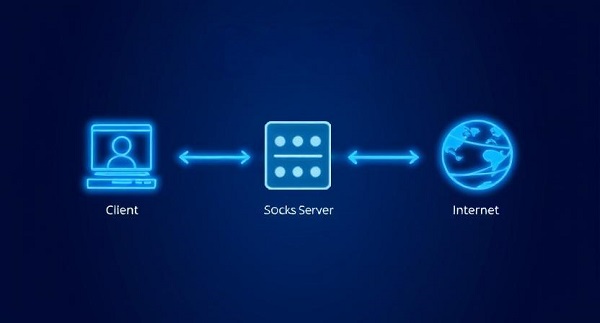
SOCKS proxies forward raw TCP (and with SOCKS5, UDP) traffic — they don’t rewrite HTTP headers or inspect application payloads by default. That makes SOCKS useful for non-web apps (games, torrenting, custom TCP clients) as well as web browsing
A Brief History of SOCKS: From Origins to Modern Relevance
SOCKS originated in the early 1990s and was extended into what is now SOCKS5 (documented in RFC 1928). The protocol has been stable for decades — today its value comes from how it’s deployed (remote DNS, auth, encryption tunnels) and from tools built around it. In recent years SOCKS has remained useful for testing, automation, gaming, and authorized security work.
When to Use SOCKS vs HTTP proxy vs VPN (Quick Comparison)
| Need |
Use SOCKS when |
Use HTTP/HTTPS proxy when |
Use VPN when |
| App-level proxy for multiple protocols |
(SOCKS handles TCP + UDP) |
× (HTTP only) |
× (full-device) |
| Whole-device encryption / LAN access |
× |
× |
√ |
| Web filtering / header rewriting |
× |
√ |
× |
| Quick per-app use |
√ |
√ |
× |
Important Safety Notes (Before Using)
SOCKS does not encrypt traffic by itself. If the app/site doesn’t use TLS, traffic may be visible to the proxy operator or network middleboxes. For confidentiality, combine SOCKS with SSH dynamic forwarding or a VPN.
Avoid untrusted open proxies. Exit proxies can log or tamper with traffic. Use servers you control or reputable managed providers.
DNS leaks: Prefer remote DNS resolution via SOCKS5 (see test below) to avoid leaking visited hostnames from local DNS.
Respect laws and policies: Don’t use SOCKS to evade corporate controls or to conduct unauthorized activity.
Quick, Safe SOCKS Proxy Setup
Replace user and remote.server.example with your host.
1. Open a terminal and run
ssh -D 1080 -C -N [email protected]
- -D 1080 opens a dynamic SOCKS5 proxy on localhost:1080.
- -C enables optional compression. -N keeps the tunnel open without running a remote shell.
2. Point your browser to the proxy
Firefox: Preferences → Network Settings → Manual proxy configuration → SOCKS Host localhost, Port 1080 → select SOCKS v5 → enable “Proxy DNS when using SOCKS” (option wording may vary).
Chromium/Chrome (test instance):
chromium --proxy-server="socks5://localhost:1080"
(Replace chromium with your browser binary.)
3. Verify exit IP & DNS resolution
curl --socks5-hostname localhost:1080 https://ifconfig.co
--socks5-hostname forces hostname resolution through the proxy to avoid local DNS leaks. If the returned IP matches your remote server’s IP, your proxy is working.
Common Basic Troubleshooting
I still see my real IP: The app may not be using the proxy. Double-check app/browser proxy settings; some apps ignore system proxies and need a socksifier or per-app proxy setting.
DNS tests show local DNS: Enable remote DNS in the client or use --socks5-hostname with curl.
Port 1080 blocked: If port 1080 is blocked, try SSH on port 22 or configure the server to listen on another allowed port (authorized scenarios only).
Two Useful Alternatives
1. If you prefer not to host a server
Consider a managed SOCKS proxy for instant setup, regional exit IPs, and built-in authentication.
Explore a managed SOCKS option, like GoProxy.
2. For production or sensitive workflows
Many teams choose a managed service that documents authentication, logging policies, and SLAs. See reliable features on our SOCKS Proxy plans.
FAQs for Absolute Beginners
Q: Is SOCKS safe for online banking?
A: Only if the banking site/app uses HTTPS/TLS. SOCKS hides your IP but does not add encryption.
Q: Will SOCKS bypass geo-blocks?
A: Often — if the proxy exists in the permitted region. Some services detect proxies and block them.
Q: Can I use SOCKS on my phone?
A: Some apps respect Wi-Fi proxy settings; many do not. For reliable mobile use, consider per-app VPNs or specialized proxy apps.
Where to Go Next
Tried the quick setup and want protocol internals, diagnostics, and enterprise deployment? Read SOCKS Web: Advanced Guide.
Final Thoughts
With privacy threats rising and geo-blocks everywhere, SOCKS proxies are a sneaky, powerful fix. SOCKS5 is versatile and protocol-agnostic; depending on how it’s deployed it may be treated differently by network filters than HTTP proxies or VPN tunnels. Perfect for torrenting, gaming, or just staying under the radar. Beginners can set it up in minutes, and pros love its flexibility.
Want to dive in? Check out GoProxy SOCKS5 options. Sign up for a free trial and unlock the internet your way!



