
Golang Web Scraping Guide: Build Fast, Reliable Scrapers
Learn step-by-step Go scraping: goquery, Colly crawlers, headless rendering, anti-blocking strategies, and scaling.
Mar 18, 2026



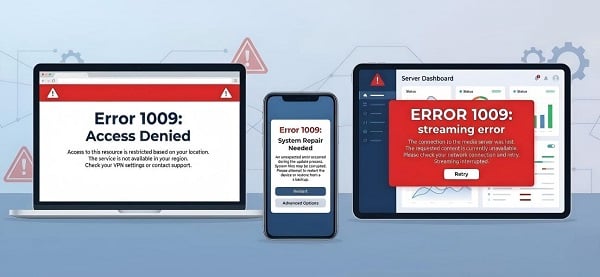
Error 1009 can mean different things in Cloudflare, Windows, streaming apps, App Store downloads, QuickBooks, and legacy games. Identify your case and follow the right fix.
Error 1009 is not one single bug. Different systems (websites, Windows, streaming apps, app stores, business software, and old games) reuse the exact same number for completely unrelated problems. The fix that works for one version will do nothing for another. Match your exact message first, then follow the correct section.
| Exact Message or Symptom | What It Usually Means | Jump to This Section |
| “Access Denied,” “Country or region banned,” or website won’t load | Cloudflare / website IP or geo block | Cloudflare / Website Error 1009 |
| “The configuration registry database is corrupt” (in Command Prompt) | Windows registry hive corruption (breaks DISM & repairs) | Windows DISM / Registry Error 1009 |
| “Could not reach the service (-1009)” | Streaming app connectivity issue (Netflix, Apple, etc.) | Streaming Apps Error -1009 |
| Marketplace / App Store download or update fails | Region or account restriction (mainly Apple App Store) | App Store / Marketplace Error 1009 |
| “Internal error 1009” during migration or import | QuickBooks Desktop Migration Tool or data transfer issue | QuickBooks / Migration Error 1009 |
| “TypeError: Error #1009: Cannot access a property or method of a null object reference” | Legacy app, Flash/ActionScript, or old game null reference | Game / Legacy App Error #1009 |
Most users see Cloudflare or Windows — start with those if unsure.
1. Copy the exact error message you see.
2. Find the matching row above.
3. Start with the first step in that section.
4. Test after every step.
5. Never skip to advanced fixes unless basics fail.
Typical message: “Access Denied,” “Country/region banned,” or a page that refuses to load
Cloudflare (or similar CDN security) is blocking your IP, country, or traffic pattern. Very common when traveling, using VPNs, shared networks, or scraping tools.
1. Switch to mobile data (not Wi-Fi).
2. Open the site in Incognito/Private mode.
3. Clear cookies & cache for that site only.
4. Try a different browser.
5. Disable ad blockers, privacy extensions, or VPN temporarily.
6. Test on another device or network.
If it works on one network but not another → it’s an IP/geo block.
Choose a server in an allowed country.
Keep the same location during the entire session.
Match browser language and time zone to the region.
Avoid free/public VPNs (they’re often blacklisted).
Use geo-targeted residential proxies, realistic pacing, proper headers, and session rotation. Best long-term solution: use the site’s official API if one is available and allowed.
The page loads normally, the “Access Denied” message is gone, and it stays working after multiple refreshes.
Typical message: “The configuration registry database is corrupt”
The COMPONENTS registry hive is damaged. This breaks DISM, Windows Update, system repair tools, and other maintenance tasks. Usually caused by failed updates, power loss, or disk errors.
Run in Administrator Command Prompt:
1. sfc /scannow
2. chkdsk C: /scan (If it reports issues, restart and allow Windows to repair them)
3. DISM /Online /Cleanup-Image /RestoreHealth
Back up important files first.
Boot into Windows Recovery (Shift + Restart) → Startup Repair.
If the issue remains, use an In-Place Repair Install with an official Windows ISO. This is usually the safest permanent repair because it can keep your files and apps intact.
Do not use random registry cleaners.
Do not install untrusted “repair” tools from the web.
Do not manually replace system files unless you fully understand the risk.
DISM completes successfully, Windows Update and features work again, and the corruption message disappears.
Typical message: “Could not reach the service (-1009)”
This is usually a network or cached-data problem. The app cannot reach its servers, so it fails to load content, sign in, or start playback.
1. Force-close the app completely.
2. Restart your device.
3. Power cycle modem + router (30 seconds).
4. Try a different network (e.g., mobile data).
5. Clear app cache (Settings → Apps → [App] → Storage).
6. On Android/iOS: clear app data and sign in again.
7. Set DNS to Automatic or try Google DNS (8.8.8.8).
Turn them off temporarily — many streaming apps block or get confused by them.
The app opens normally, content loads, and playback starts without the -1009 message.
Typical symptom: download, purchase, or update fails
This is often a region, account, or store-availability issue. It is especially common in Apple App Store and similar marketplace systems.
1. Confirm the app is available in your country.
2. Go to Account Settings → Country/Region and verify it matches.
3. Sign out of the App Store / Apple ID, then sign back in.
4. Disable VPN and retry on a supported network.
5. Verify that your payment method and billing region match the store region.
Changing account region can affect subscriptions, previous purchases, and payment settings. Make the change carefully.
The app downloads, updates, or installs successfully, and the store no longer shows Error 1009.
Typical symptom: “Internal error 1009” during migration or import
The migration or import process was interrupted. Common causes include version mismatch, certificate prompts, tool issues, or moving too much data at once.
1. Update QuickBooks and the Migration Tool to the latest version.
2. Restart the computer.
3. Run migration with smaller data batches.
4. Accept any certificate/trust prompts.
5. Use the tool’s built-in diagnostic/repair option if available.
Split the migration into smaller chunks.
Keep a backup of the source data.
Check each chunk after import.
Record any warnings or skipped records.
Migration completes fully, imported data matches the source, and no prompts block the process.
Typical message: TypeError: Error #1009: Cannot access a property or method of a null object reference
Classic null-reference error usually occurs in older Flash-based software, legacy applications, or older games where one object is missing or not loaded correctly.
1. Disable all mods, overlays, and add-ons.
2. Verify game files (Steam/launcher) or reinstall the app.
3. Update the game + graphics drivers.
4. Run with a clean configuration.
5. Re-enable mods one by one to find the conflict.
If the app depends on an old runtime, you may need to update that runtime or remove the extension that triggers the error.
The app launches normally and the same action no longer crashes with Error #1009.
Websites/Scraping: Use stable regional IPs, realistic pacing, and official APIs when possible.
Windows: Keep Windows updated, run disk checks periodically, and back up important files before major repairs.
Streaming: Clear cache occasionally, avoid VPN conflicts, and restart the network if playback issues return.
Apps & Migrations: Update first, move data in smaller batches, and keep records of every step in the process.
Q: Is Error 1009 dangerous?
A: Usually no. It is almost always a configuration, connectivity, or compatibility issue rather than malware or hardware failure.
Q: Do I have to reinstall Windows?
A: Almost never. Most of registry cases are fixed with SFC/DISM or In-Place Repair (files & apps stay intact).
Q: What if my exact error isn’t listed?
A: Copy the full message + app name/version and Google it with “error 1009”. Or use the support tips below.
Contact support if:
Windows repair still fails after In-Place Repair
The issue involves financial, medical, or legal data
You need official access approval or whitelisting
You’re uncomfortable with recovery tools
What to tell support: Exact error text, app name + version, device/OS, steps already tried.
Error 1009 is usually fixable once you identify the exact context. The number itself does not tell you the cause. The message, app, and system do.
Start with the correct branch, follow the basic steps first, and verify after each change. In most cases, that approach solves the problem without data loss or unnecessary reinstalling.
Next >


 Cancel anytime No credit card required