
2026 Best Amazon Scraping APIs: Comparison & Buyer's Guide
Explore the top Amazon scraping APIs in 2026 with features, pricing, legal tips, pilot tests, and pipelines for reliable product data extraction.
Jan 27, 2026



Learn what proxy web browsers are, how they differ from VPNs and regular browsers, and the best proxy web browsers in 2026 for privacy, multi-accounting, geo-bypassing, and scraping.
Online platforms are more aggressive at tracking users, flagging suspicious activity, and enforcing geo-restrictions. A dedicated proxy web browser can make a great difference—whether you’re managing multiple social media accounts, scraping data for market research, streaming region-locked content, or simply protecting your privacy.
Unlike regular browsers that force you to fiddle with extensions or system-wide settings, proxy web browsers are purpose-built to route traffic through proxies while spoofing fingerprints, isolating profiles, and minimizing detection risks. This guide will cover clear explanations, real-world use cases, how to choose the right one, 2026 top picks, and practical setup tips.
A proxy web browser is a browser (or browser-like tool) that routes your traffic through a proxy server instead of connecting directly from your real IP address.
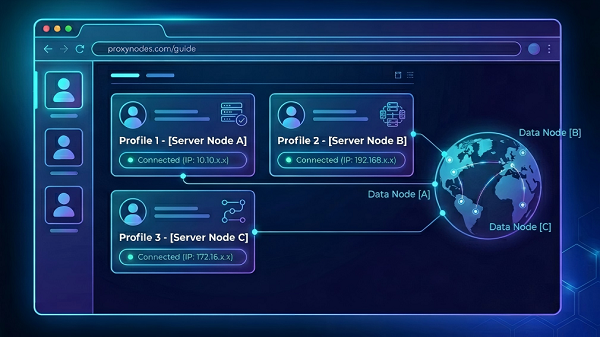
Websites don’t just see your IP address — they also collect a unique “fingerprint” made of 50+ signals like your screen resolution, installed fonts, graphics card details (canvas/WebGL), timezone, language, and even how your browser renders audio or handles hardware. Many advanced proxy browsers — often called anti-detect or multi-profile browsers — go far beyond simple proxy routing by also:
The simplest way to understand the differences:
| Tool | Scope | Main Strength | Best For |
| VPN | Entire device | Full-device encryption & privacy | Everyday browsing, torrenting |
| Proxy Web Browser | Browser session only | Per-profile routing + fingerprint spoofing | Multi-accounting, scraping, geo-bypassing |
| Regular Browser | Browser session only | Convenience | Normal daily use (with extensions) |
A regular browser can use proxies via extensions, but it lacks deep profile isolation and advanced fingerprint spoofing. That’s why dedicated proxy browsers win for serious work.
At the basic level, the browser sends your requests through a proxy server so the target website sees the proxy IP instead of yours. Anti-detect versions add a second powerful layer: they isolate each profile (separate cookies, storage, and cache) and actively modify fingerprint signals to make every profile look like a real, unique device.
Proxy quality still matters enormously. Even the best browser can’t hide a low-quality, overused, or datacenter proxy. The winning formula is always: strong profile isolation + high-quality proxy + consistent session behavior.
Focus on these practical factors (in order of importance for most beginners):
1. Match the tool to your goal — Multi-account management? Choose a full anti-detect browser. Simple privacy? Brave or Tor may be enough.
2. Profile isolation — Must create separate profiles with independent cookies and fingerprints.
3. Number of profiles needed — Casual users: 3–10. Marketers/scrapers: 100+.
4. Fingerprint spoofing quality — Look for 50+ parameters randomized with realistic noise.
5. Proxy compatibility — Built-in tester + support for residential/mobile proxies (far less detectable than datacenter).
6. Platforms & automation — Windows, macOS, Linux, Android; Selenium/Puppeteer support if you automate.
7. Ease of use — Beginners want one-click setup; pros want templates and bulk actions.
8. Pricing & free tier — Free plans exist, but are limited for serious work.
9. Speed & stability — Low latency matters for long sessions or scraping runs.
| Browser | Free Tier | Platforms | Fingerprint Params | Built-in Proxies? | Automation Support | Best For | Key Strength | Main Drawback |
| GoLogin | 3 profiles | Win/macOS/Linux/Android | 53+ + noise | Yes (free proxies + custom) | Yes (Selenium, Puppeteer, API) | Beginners & multi-accounting | Super easy, built-in proxies | Slightly higher at very large scale |
| 1Browser | 10 profiles | Win/macOS/Linux/M-series | Advanced | Yes (residential, datacenter, free) | Yes (extensions + API) | Balanced everyday + business | Fast, stable, generous free tier | Newer player |
| Multilogin | Limited trial | Win/macOS/Linux | Full spoof (highest quality) | Partial (some traffic included) | Yes (templates, cloud sync, API) | Professional SMM & scraping | Mature platform, team features | More expensive |
| AdsPower | 2 profiles | Win/macOS/Linux | Strong | External only (excellent manager) | Excellent (built-in RPA + Selenium/Puppeteer) | Large-scale automation | Mass actions & no-code RPA | Steeper learning curve |
| Dolphin Anty | 5 profiles | Cross-platform | Excellent (30+ params) | External only | Yes (templates & basic scripting) | TikTok/Instagram heavy users | Lightweight & fast | Fewer built-in proxies |
| Tor Browser | Unlimited | All major | High anonymity | No (Tor network only) | Limited | Maximum privacy | Open-source, onion routing | Slower speeds |
| Brave | Full | All major | Good (aggressive mode) | Limited | No | Everyday privacy + Shields | Built-in ad/tracker blocker | Limited third-party proxy support |
| CroxyProxy | Unlimited | Web-based (no install) | Basic | N/A (web proxy) | No | Quick anonymous sessions | No download, video support | Less control & spoofing |
GoLogin is positioned around multi-account management, fingerprint modification, custom proxies, and bulk settings management. Its pricing page shows a free plan with 3 profiles and a 7-day trial for paid features, which makes it useful for testing before committing.
1Browser markets itself as a proxy browser with built-in residential, datacenter, and free proxies, and it offers up to 10 isolated profiles for free. It is a strong fit when the main goal is simple multi-profile browsing without a steep learning curve.
Multilogin’s official pages emphasize anti-detect browsing, multi-account management, proxy integration, and account isolation. Its pricing pages show a low-cost trial and paid plans starting at €9/month, which makes it a serious option for users who need a mature platform rather than a lightweight tool.
AdsPower offers a permanent free plan with 2 profiles, a 7-day free trial, and paid tiers for larger profile counts. It is clearly designed for users who need profile management, proxy configuration, and multi-system fingerprint handling in one place.
Dolphin Anty’s official pricing page says it offers 5 free profiles, and the company also refers to free-plan updates and expanded free-profile options in its blog. That makes it a practical starter choice for users who want to test anti-detect browsing before paying.
Brave is not a full anti-detect browser, but it is excellent for everyday privacy. Brave’s Shields block trackers, cross-site cookies, ads, and fingerprinting, and Brave also says its fingerprinting protection randomizes some fingerprint data to reduce tracking.
Tor Browser routes traffic through the Tor network and is specifically built to resist online tracking and fingerprinting. The Tor Project says its defenses make users look more similar and harder to identify, which is exactly why it remains the strongest mainstream choice for anonymity-focused browsing.
CroxyProxy is a browser-based web proxy that requires no installation or configuration and is designed for quick access to websites and web apps. It is useful when the need is temporary access, not a full account-isolation workflow.
1. Choose the right proxy type first: residential or mobile for account work; datacenter only for low-risk testing.
2. Create one profile per identity, assign a dedicated proxy, and verify the connection with a site like whatismyipaddress.com.
3. Test the target website in the profile before scaling.
4. Keep it simple — avoid layering VPN + proxy browser + extensions unless you have a specific reason. Clean workflows are more stable.
Do not assume a proxy browser makes you invisible. They all reduce exposure in different ways, but none of them guarantee perfect anonymity.
Do not pair a strong browser with a weak proxy. Low-quality or overloaded proxies are a common cause of failures, especially when sessions are long-lived or multiple profiles are used. The browser can help, but it cannot fix a bad IP.
Do not use a heavy anti-detect browser when you only need private browsing. If the goal is to block trackers or reduce fingerprinting during normal browsing, Brave or Tor Browser may be a better and simpler match. If you only need a temporary unlocked page, CroxyProxy is enough.
Can I just use Chrome with a proxy extension?
Yes, but you’ll miss deep profile isolation and advanced fingerprint spoofing that dedicated proxy browsers provide.
Are free proxy browsers safe?
Established ones like Brave, Tor, and the free tiers of GoLogin, 1Browser, AdsPower, and Dolphin Anty are generally safe. Avoid unknown free proxies.
Do proxy web browsers slow browsing down?
It depends on the proxy. Tor is slower by design; most anti-detect browsers feel near-native with good residential proxies.
Which works best with residential proxies?
GoLogin, 1Browser, Multilogin, and AdsPower are built specifically for high-quality proxy workflows.
The best proxy web browser is the one that matches your exact task, budget, and comfort level. For most people doing multi-account management, GoLogin or 1Browser offers the ideal mix of ease and power. Need heavy automation? Go with AdsPower. Just want privacy? Brave or Tor is plenty.
Start with the free tier that fits your needs, test with your real proxies, and scale only when you’re confident. The right tool + good proxies + smart behavior is what keeps accounts safe and workflows smooth.
Next >


 Cancel anytime No credit card required