
Auto Like on Instagram: Safe Strategies, Risks & Better Alternatives (2026)
Discover whether auto likes still work in 2026, what risks they carry, safe Meta-approved options, and safer organic strategies for lasting growth.
Mar 13, 2026



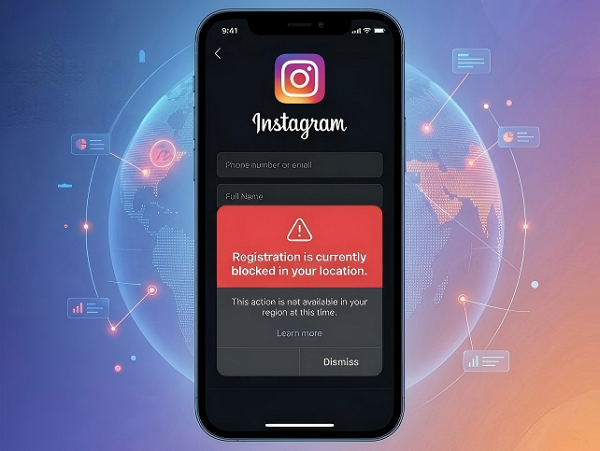
Learn what “Registration is currently blocked in your location.” means on Instagram, how to diagnose, and step-by-step fixes for network, device, app, session, and account issues.
If you are trying to create a new Instagram account and see “registration is currently blocked in your location,” the safest interpretation is not “your country is permanently banned.” This message almost always means a temporary glitch. Instagram’s own help flow points users toward app troubleshooting, reporting technical problems, and checking Account Status rather than treating this as a simple geography block. You can still create a new account on the app or at instagram.com using just an email and username. This guide will help you clear the diagnosis first, then fix it in the exact order that works for most people.
Instagram is simply rejecting the current signup attempt. It is not proof of a permanent location ban.
The most common triggers (in order of frequency):
Instagram’s official troubleshooting follows the same pattern: rule out basic connection and app issues first, then check Account Status if you already have an account.
Use this exact order before trying any fixes:
Turn off any VPN completely. Switch from Wi-Fi to mobile data, or from mobile data to Wi-Fi. If the signup works on one connection but not the other, the problem is likely tied to your current IP/network path rather than the signup form itself. Instagram’s troubleshooting guidance starts with checking the internet connection when something is not working correctly.
Try another phone, tablet, or open a private/incognito window on a desktop. If it works there, the problem is likely local to your original device or cached session.
If you already use Instagram, log in to that account → Profile → Menu → Settings and privacy → Account Status. This area shows whether something you posted may go against Community Standards and whether it may lead to account limitations.
Apply these in order. Most people only need the first 3 steps.
Instagram’s help pages say to restart your phone or tablet first when you are having trouble, and its app-specific troubleshooting recommends updating Instagram to the latest version. Do both before you try the signup again.
Android: Settings → Apps → Instagram → Storage → Clear Cache
iOS: Settings → General → iPhone Storage → Instagram → Offload App (or delete and reinstall)
If restarting and updating do not help, uninstall and reinstall the app as the next step. This is useful when the app state itself seems to be the problem.
On desktop or mobile web, open a private/incognito window and try again. On the app, fully close Instagram, reopen it, and test the signup in a clean session. The point here is to eliminate any broken session state that may be interfering with registration.
Instagram says you can create a new account on desktop, mobile, or tablet, and you do not need Facebook to do it. If the app fails, the web flow is worth testing because it gives you a separate signup path.
Make sure the email address and username are accurate and not being reused in a confusing way across repeated failed attempts. This is one of the most common places where signup attempts get stuck.
If the error still appears, use Instagram’s built-in reporting path.
A simple message is enough:
I am trying to create a new Instagram account, but registration is blocked. I already tried a different network, updated the app, restarted my device, cleared cache, tested a clean session, and tried desktop.
If nothing works after all steps: Some IP-level blocks are temporary. Wait 24–48 hours and retry on mobile data only (no VPN). Thousands of users report the error disappears on its own.
Advanced option for IP-related blocks: Try a clean residential proxy service for a fresh, non-flagged IP address that Instagram treats like a normal home connection.
Do not keep tapping the signup button repeatedly (it can make the temporary block worse).
Do not skip the network/cache steps and jump straight to reinstall or desktop.
Do not assume the message means a permanent location ban — Instagram’s support pages always push troubleshooting first.
Once your account is created:
1. Why does Instagram say “Registration is currently blocked in your location.”?
In most cases, it means Instagram is rejecting the current signup attempt for technical reasons (network, session, or IP), not your physical location is permanently banned.
2. Can I create a new Instagram account on desktop?
Yes. Instagram says you can create a new account on desktop, mobile, or tablet without needing Facebook.
3. What should I do first?
Restart your device, check your internet connection (VPN off), update the app, and clear cache. These are Instagram’s official first actions.
4. When should I report the issue?
Report it after you have already tried the basic fixes and the clean signup test. Use the example message provided above.
The message “registration is currently blocked in your location” is almost always a fixable signup glitch — not a permanent ban. Start with the simplest checks, move through the clean-session and web-signup tests, then escalate through Instagram’s built-in reporting and Account Status tools when needed. That is the most efficient path for a user who wants the account created quickly and cleanly.
Next >


 Cancel anytime No credit card required