
Complete Fix Guide on YouTube Error “There was a problem with the server[400]”
Fix YouTube Error 400 on desktop, Android, iPhone, YouTube Music, and embedded players with step-by-step solutions.
Mar 23, 2026



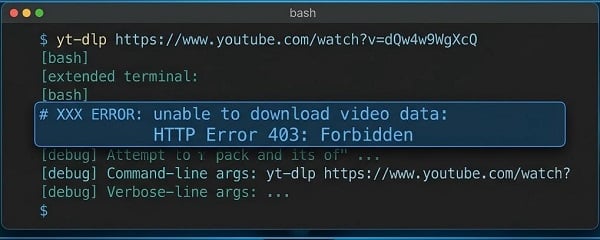
Fast fixes for yt-dlp ERROR: unable to download video data: HTTP Error 403: Forbidden. Update, clear cache, add fresh cookies, or switch formats — most solved in 10min.
When you run yt-dlp and see ERROR: unable to download video data: HTTP Error 403: Forbidden, the server isn’t saying the video is gone. It’s saying it understands your request but refuses to authorize the actual video file. You can still see the title, thumbnail, and format list — but the moment yt-dlp tries to grab the real media stream, it fails.
This is one of the most common yt-dlp errors, and the good news is that most cases are fixed in under 10 minutes once you apply the matching fix.
yt-dlp -U --rm-cache-dir --cookies-from-browser chrome -4 --impersonate chrome "YOUR_VIDEO_URL"
Replace chrome with firefox, edge, or safari if needed. This single line hits the top fixes and solves most of 403 errors instantly.
Try these three actions in this exact order:
1. Update yt-dlp — yt-dlp -U
2. Clear the cache — yt-dlp --rm-cache-dir
3. Add fresh browser cookies — yt-dlp --cookies-from-browser chrome "VIDEO_URL" (detailed instructions below).
A 403 in yt-dlp is an authorization or client-validation refusal at the media URL level — not “video removed.” The server wants proof that the request comes from a valid browser session or a supported client.
Current YouTube protections include:
Missing or stale cookies (age-restricted, private, members-only, or region-gated videos)
Mismatched client headers or impersonation
Unresolved JavaScript challenges (requires external JS runtime)
Missing PO Token for certain formats/clients (yt-dlp cannot generate these itself).
Match what you see to the most likely cause:
Metadata loads but download fails instantly → Signature/token/PO-token issue (most common)
Works in browser but not yt-dlp → Missing cookies, headers, or client identity
One format fails while another succeeds → Format-specific block
Works on one device/network but not another → Cache, cookies, IP, or rate-limiting
Starts downloading then fails midway → Mid-download token expiry or rate limit
Follow these in order. Most users do not need to go beyond step 3:
YouTube changes daily. yt-dlp’s issue templates always start here.
yt-dlp -U
Test the video again before anything else.
Stale extractor data survives updates.
yt-dlp --rm-cache-dir
Run under the exact same user account.
Easiest method (recommended):
yt-dlp --cookies-from-browser chrome "VIDEO_URL"
(Replace chrome with firefox, edge, safari, or whichever browser you use.) Close the browser completely before running the command if it doesn’t work the first time.
Manual fallback (if --cookies-from-browser fails):
1. Open your browser and log in to YouTube (make sure the video plays).
2. Install a free “Get cookies.txt” or “Cookie Editor” extension.
3. Export cookies from that exact tab and save as cookies.txt.
4. Run:
yt-dlp --cookies cookies.txt "VIDEO_URL"
Safety notes: Cookies expire — re-export when the error returns. Never share your cookie file.
Remove any -f flag and let yt-dlp pick the best format automatically.
yt-dlp "VIDEO_URL"
If it works, you’re done. Many 403 errors only affect specific formats (especially separate video+audio).
If downloading many video, add a short pause between requests:
yt-dlp --sleep-interval 2 --max-sleep-interval 5 "VIDEO_URL"
Switch to mobile hotspot, force IPv4, or route through a proxy/proxies (especially for geo-restricted /rate-limited connections):
yt-dlp -4 "VIDEO_URL"
yt-dlp --proxy http://your-proxy-ip:port "VIDEO_URL"
(Replace with your proxy HTTP/SOCKS5 address. Residential proxies and mobile proxies work better for YouTube.)
Only try these after Steps 1–3. These address current YouTube JS/PO-token layers.
Impersonate a real browser:
yt-dlp --impersonate chrome "VIDEO_URL"
JS runtime (Deno recommended):
YouTube now requires solving JavaScript challenges. Deno is enabled by default in recent yt-dlp; force it if missing:
yt-dlp --js-runtimes deno "VIDEO_URL"
(Node, Bun, or QuickJS also supported via --js-runtimes.)
PO-token handling:
Some formats return 403 without a valid PO Token. yt-dlp cannot generate these itself — use a PO-token provider plugin (recommended in the official wiki) rather than manual extraction, as tokens are video-ID-bound.
Combined example:
yt-dlp --impersonate chrome --extractor-args "youtube:player_client=web,android" --js-runtimes deno "VIDEO_URL"
Don’t retry the same failing command in a tight loop — it worsens rate-limiting.
Don’t assume every 403 means your account is banned (most are client/validation issues).
Don’t skip cache clear or cookies before jumping to advanced flags.
Don’t reuse direct media URLs across devices/days — they expire.
Run yt-dlp -U weekly (YouTube changes fast).
Refresh cookies for any protected video.
Prefer default format selection.
Keep request volume low during batch downloads.
Treat YouTube support as a moving target — JS challenges and PO tokens are now normal workflow.
Use a reliable proxy service for heavy/recurring downloads — it prevents IP-based 403s and geo-blocks before they happen.
1. Run a full diagnostic:
yt-dlp -vU "VIDEO_URL"
2. Copy the entire verbose log and open an issue at:
https://github.com/yt-dlp/yt-dlp/issues
The maintainers and community respond quickly and specifically ask for this log (it shows extractor path, cookie state, JS runtime, and PO-token steps).
The ERROR: unable to download video data: HTTP Error 403: Forbidden is frustrating but almost always fixable. Start with the Nuclear Option or the three Quick Fixes, then use the symptom-based steps. The exact causes evolve with YouTube’s PO-token and JS protections, but the logical troubleshooting path (update → cache → cookies → format → impersonation → JS/PO-token) stays the same. You should be downloading again right now!
Next >


 Cancel anytime No credit card required