
Complete Fix Guide on YouTube Error “There was a problem with the server[400]”
Fix YouTube Error 400 on desktop, Android, iPhone, YouTube Music, and embedded players with step-by-step solutions.
Mar 23, 2026



Learn step-by-step Go scraping: goquery, Colly crawlers, headless rendering, anti-blocking strategies, and scaling.
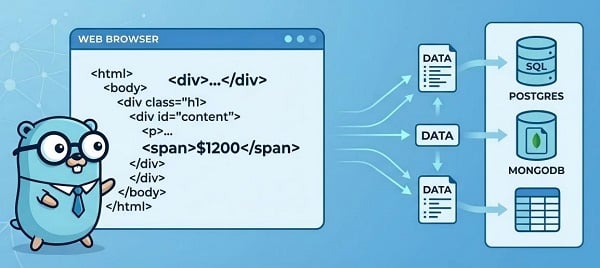
Web scraping remains one of the most powerful ways to gather real-time data for research, price monitoring, content aggregation, AI training, and more. Websites have grown smarter at detecting bots, but Go (Golang) is still the ideal language for high-performance scrapers: fast, lightweight, concurrent, and easy to deploy. This guide takes you from zero to production-ready scrapers with code examples and time-tested techniques.
Biggest tradeoff: No built-in JavaScript execution. For JS-heavy/SPA sites, you’ll use a headless browser library or a render API.
Colly — collector for crawling, callbacks, queues; common first choice for Go scraping.
goquery — jQuery-style DOM parsing for HTML.
chromedp — headless Chrome via DevTools (full JS control).
Rod — alternative headless client with built-in stealth tooling (often preferred for advanced anti-bot evasion).
Static HTML / small crawl → event-driven collector + DOM parser (fastest path).
Many pages, multi-domain → collector + queue + proxy pool.
JS/SPA pages → headless browser (full control) or a render API (lighter ops).
Start with the minimal example below, then add concurrency, proxies, and rendering only when you hit missing data or blocking.
Check robots.txt and site terms before scraping.
Avoid scraping private/PII without legal basis (GDPR/CCPA risk).
Respect rate limits and Retry-After.
Use public sandboxes for testing (e.g., quotes.toscrape.com).
1. Install the latest Go (1.26+ recommended) from go.dev and verify with go version.
2. Create a clean project:
mkdir golang-scraper && cd golang-scraper
go mod init github.com/yourusername/scraper
3. Basic familiarity with go run / go build.
4. Test target: Use a sandbox site like quotes.toscrape.com for experiments.
You will run go get for each library in the steps below — then go mod tidy once.
Goal: Lowest barrier — get HTML, parse DOM, print results.
Key principles: Stream responses, check StatusCode, set a realistic User-Agent, use timeouts.
Why: NewDocumentFromReader streams and avoids big allocations. StatusCode check prevents parsing error pages. Realistic UA reduces immediate blocks.
Setup:
package main
import (
"fmt"
"log"
"net/http"
"time"
"github.com/PuerkitoBio/goquery"
)
func main() {
url := "https://quotes.toscrape.com"
client := &http.Client{Timeout: 12 * time.Second}
req, err := http.NewRequest("GET", url, nil)
if err != nil {
log.Fatal(err)
}
req.Header.Set("User-Agent", "Mozilla/5.0 (compatible; GoScraper/1.0)")
resp, err := client.Do(req)
if err != nil {
log.Fatal(err)
}
defer resp.Body.Close()
if resp.StatusCode != http.StatusOK {
log.Fatalf("unexpected status: %d", resp.StatusCode)
}
doc, err := goquery.NewDocumentFromReader(resp.Body)
if err != nil {
log.Fatal(err)
}
doc.Find("span.text").Each(func(i int, s *goquery.Selection) {
fmt.Printf("Quote %d: %s\n", i+1, s.Text())
})
}
Run with go run main.go. You’ll see quotes printed instantly.
Goal: Multi-page crawling, parallel requests, polite limits, durable CSV writing (no file contention).
Setup:
go get github.com/gocolly/colly/v2
Tips:
Use Async(true) + c.Wait() (or colly.Queue) for safe concurrency.
Never write files from many goroutines — use a single writer goroutine + channel (pattern used in production).
Colly’s OnHTML/OnRequest/OnError pattern is the standard across Go scraping.
Code Example:
package main
import (
"encoding/csv"
"fmt"
"log"
"os"
"sync"
"github.com/gocolly/colly/v2"
)
func main() {
c := colly.NewCollector(
colly.AllowedDomains("quotes.toscrape.com"),
colly.Async(true),
)
c.Limit(&colly.LimitRule{
DomainGlob: "*",
Parallelism: 4,
RandomDelay: 500 * time.Millisecond, // polite jitter
})
out, err := os.Create("quotes.csv")
if err != nil {
log.Fatal(err)
}
defer out.Close()
writer := csv.NewWriter(out)
defer writer.Flush()
rows := make(chan []string, 256)
var wg sync.WaitGroup
wg.Add(1)
go func() {
defer wg.Done()
for r := range rows {
_ = writer.Write(r)
}
}()
c.OnRequest(func(r *colly.Request) {
r.Headers.Set("User-Agent", "Mozilla/5.0 (compatible; GoScraper/1.0)")
})
c.OnError(func(r *colly.Response, err error) {
log.Printf("Request error [%s]: %v\n", r.Request.URL, err)
})
c.OnHTML("div.quote", func(e *colly.HTMLElement) {
rows <- []string{e.ChildText("span.text"), e.ChildText("small.author")}
})
for i := 1; i <= 5; i++ {
c.Visit(fmt.Sprintf("https://quotes.toscrape.com/page/%d", i))
}
c.Wait()
close(rows)
wg.Wait()
fmt.Println("Scraping complete! Check quotes.csv")
}
Many modern sites load data via JavaScript. Pure HTTP misses content.
Setup:
go get github.com/chromedp/chromedp
Code Example:
package main
import (
"context"
"log"
"time"
"github.com/chromedp/chromedp"
)
func main() {
ctx, cancel := chromedp.NewContext(context.Background())
defer cancel()
ctx, cancel = context.WithTimeout(ctx, 20*time.Second)
defer cancel()
var html string
url := "https://quotes.toscrape.com/js"
err := chromedp.Run(ctx,
chromedp.Navigate(url),
chromedp.WaitVisible(`span.text`, chromedp.ByQuery),
chromedp.OuterHTML("html", &html),
)
if err != nil {
log.Fatal("render error:", err)
}
log.Println("Rendered HTML length:", len(html))
}
Note: First run downloads Chrome (~10–15s). Always use context timeouts. Rod is a great alternative if you need built-in stealth.
Don’t want to manage browsers? Use a render service.
Pros: No browser management, simpler scaling. Cons: Cost per render.
Modern anti-bots use TLS/JA3 fingerprinting, behavioral analysis, and rate limits. Apply in this order.
1. Rotate User-Agent & headers — maintain a pool of realistic UAs and rotate per request.
2. Per-domain limits + jittered delays — avoid fixed, repetitive timing.
3. Proxy rotation with health checks — rotate IPs and retire failing proxies. Use per-proxy counters and cooldowns. Tip: A reliable proxy IP service (e.g., GoProxy) gives you access to millions of rotating residential IPs plus built-in health monitoring, so you can automatically retire slow or blocked proxies.
4. Cookie & session handling — preserve cookies per domain to emulate real sessions.
5. Retry with exponential backoff + circuit breaker — back off on 429s and quickly stop hammering a domain after repeated failures.
Headless stealth & browser fingerprint evasion (stealth plugins, viewport randomness).
TLS/J.A.3 fingerprint normalization — advanced anti-bot defenses may fingerprint TLS; consider providers that normalize TLS handshakes.
Proxy scoring & quarantining — automated proxy health scoring is essential in large pools.
Colly proxy rotation (per-request)
Single-proxy setups get blacklisted quickly; rotating and scoring proxies keeps throughput stable.
import (
"net/url"
"sync/atomic"
)
proxies := []string{"http://proxy1:port", "http://proxy2:port", ...}
var idx atomic.Int32
c.SetProxyFunc(func(_ *http.Request) (*url.URL, error) {
i := idx.Add(1) % int32(len(proxies))
u, _ := url.Parse(proxies[i])
return u, nil
})
Never print to console in production. Here is a ready CSV exporter:
func saveToCSV(data [][]string, filename string) error {
file, err := os.Create(filename)
if err != nil {
return err
}
defer file.Close()
writer := csv.NewWriter(file)
defer writer.Flush()
return writer.WriteAll(data)
}
Always store raw HTML (or JSON) for auditing and re-scraping.
Suggested schema: id, source_url, scrape_time, raw_html_path, field1, field2, metadata (JSON), scraper_version.
Vertical: Increase Parallelism per domain.
Horizontal: Multiple containerized workers with separate proxy pools.
1. Scheduler (priority + per-site quotas).
2. Stateless worker pool pulling from Redis/Postgres queue.
3. Proxy manager with scoring/quarantine.
4. Optional renderer cluster (or render API layer).
5. Result pipeline (raw HTML → parser → DB/data lake).
6. Observability: Prometheus + Grafana (requests/sec, block rate, proxy health).
Tip: Start with one worker + persistent queue. Keep Docker images tiny (Alpine base).
No items found → Inspect final HTML (browser DevTools or headless).
403 / 429 → Slow down, rotate UA + proxies, obey Retry-After.
chromedp hang → Add timeouts + WaitVisible; catch context.DeadlineExceeded.
Memory growth → Always resp.Body.Close() and limit concurrency.
CAPTCHA → Use human-in-the-loop or skip (auto-solving is fragile).
Selector mismatch → Fetch raw HTML and adjust selectors.
Q: Is web scraping legal with Go?
A: Yes, if you respect robots.txt, terms, and rate limits.
Q: Colly vs chromedp – which should I use?
A: Colly for 90% of static/multi-page jobs. chromedp/Rod only when JS is required.
Q: Does Go need Docker for production scrapers?
A: Recommended — single binary + Alpine = <15 MB images.
Q: How do I avoid getting blocked in 2026?
A: Start with basic techniques above; add proxies + jitter early. Consider a reputable proxy service for residential rotation.
Q: Can I scrape JavaScript sites without managing Chrome?
A: Yes — use a Render API.
Start small with goquery → upgrade to Colly → add rendering or proxies only when needed. Most time is spent on anti-blocking and scaling — implement those early and monitor everything.
You now have a complete, production-ready Golang web scraping foundation. Copy the code, run it today, and scale as your project grows.
< Previous
Next >


 Cancel anytime No credit card required