Ever hit a wall trying to stream a show that’s locked behind a geo-restriction? Or maybe you’re just tired of feeling like someone’s peeking over your shoulder every time you browse. That’s when Clash proxies come into play. By routing your traffic through external servers, you can bypass regional locks, boost privacy, and even improve speed.
If you’re here because you typed "inurl:clash/proxies" into Google, you’re on the right track. In this guide, we will share how to find, set up, and fine-tune Clash proxies to optimize your online experience. Let’s get started.
What are Clash Proxies?
Before we dig into the how-to, let’s cover the basics.
Clash is a brilliant proxy utility that lets you manage your internet traffic like a pro. Unlike simple VPNs, Clash operates on both the network and application layers, applying custom rules (by domain, IP, or protocol) to decide which traffic goes through which proxy.
Proxies? They’re the middlemen—servers that sit between you and the web, hiding your real IP address and unlocking all sorts of possibilities.
So why pair proxies with Clash?
Dodge Censorship: Say goodbye to “this content isn’t available in your region.”
Unlock Geo-Restricted Goodies: Want Netflix US from outside the States? Done.
Stay Under the Radar: Mask your IP and browse with peace of mind.
Find Reliable Clash Proxies
If you’re searching "inurl:clash/proxies," you’re likely after proxy lists or resources tailored for Clash. Smart move—it’s a niche query that cuts through the noise. But not every proxy source is worth your trust.
1. Use "inurl:clash/proxies" Like a Pro
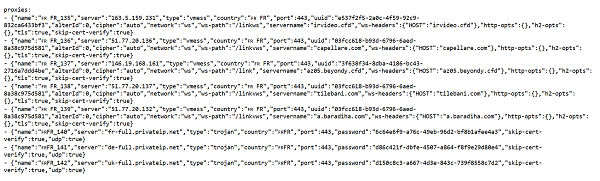
This search operator tells Google to find pages with "clash/proxies" in the URL—like proxypool.link/clash/proxies?c=FR. It’s a goldmine for Clash-specific proxy lists. But don’t just click the first result. Look for:
Freshness: Proxies die fast. Sites that update regularly (daily or weekly) are your best bet.
Details: Good sources list proxy types (HTTP, SOCKS5) and locations (e.g., France, US).
Community Buzz: Check forums or GitHub for user chatter about reliability.
2. Top Free Sources
Proxypool.link: Offers country-filtered proxy lists for Clash. Handy if you need something specific, like a French IP.
GitHub Repositories: Search “Clash proxy list” there—tons of developers share free configs.
Proxy forums: Places like BlackHatWorld often have hidden gems.
Pro tip: Cross-check proxies across multiple sources.
3. Paid Providers
Many proxy companies offer Clash subscription endpoints—search for “Clash proxy subscription” for premium options. For example, GoProxy offers quality residential proxies and datacenter proxies for Clash. Flexible choices for your needs.
Step-by-Step Setup in Clash
Now let’s get them running in Clash.
1. Install Clash
Windows: Download from the official repository.
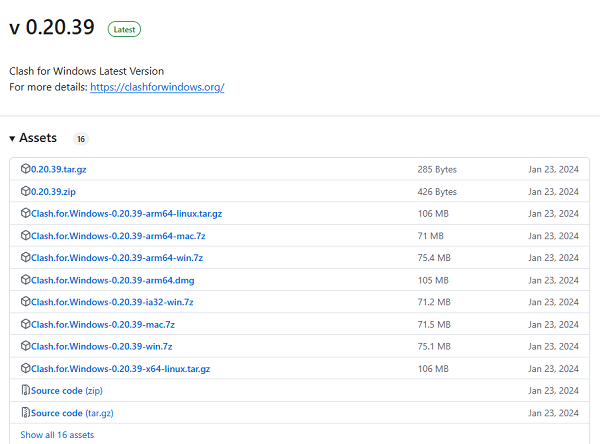
macOS: Install ClashX via Homebrew (brew install clashx).
Android/iOS: Use Clash Premium or equivalent from app stores.
2. Import Subscription URL
a. Open Clash’s Profiles tab.
b. Click “Import” and paste your https://…/clash/proxies URL.
c. Name the profile (e.g., “Global Residential”).
3. Protocol Selection & Proxy Definitions
Define each proxy’s protocol and credentials in your local YAML or via the GUI:
yaml
proxies:
- name: "US_HTTP"
type: http
server: us.proxy.example.com
port: 8080
- name: "JP_SOCKS5"
type: socks5
server: jp.proxy.example.com
port: 1080
- name: "VMess_TLS"
type: vmess
server: vmess.proxy.example.com
port: 443
uuid: your_uuid
alterId: 0
tls: true
skip-cert-verify: false
- HTTP(S): Broad compatibility for web browsing.
- SOCKS5: Handles TCP/UDP—ideal for gaming and P2P.
- Other Supported Protocols: Clash also accepts protocols like VMess or Trojan when available from your provider.
4. Routing Rules & App-Specific Rules
Control which traffic goes through which proxy:
yaml
rules:
- DOMAIN-SUFFIX,netflix.com,US_HTTP
- DOMAIN-KEYWORD,zoom,Local_Proxy
- IP-CIDR,192.168.0.0/16,Direct
- MATCH,VMess_TLS
- Domain Rules: Route streaming or banking traffic through specific proxies.
- Application Rules (ClashX GUI): Assign apps like Chrome or Zoom to designated proxies.
- Catch-All: Use MATCH for any remaining traffic.
5. DNS, TUN Mode & Encryption Settings
Optimize DNS resolution, route all traffic, and secure data:
yaml
dns:
enable: true
listen: 0.0.0.0:53
nameserver:
- 1.1.1.1
- 8.8.8.8
enhanced-mode: fake-ip
cache: true
tun:
enable: true
device: utun
auto-route: true
dns-hijack:
- 198.18.0.2:53
# TLS encryption example for VMess/Trojan proxies
proxies:
- name: "Encrypted_Proxy"
type: vmess
server: vmess.proxy.example.com
port: 443
uuid: your_uuid
alterId: 0
tls: true
skip-cert-verify: false
- Enhanced DNS: Fake‑IP mode speeds up lookups and blocks trackers.
- TUN Mode: Routes all apps—even those without proxy support—through Clash.
- TLS Encryption: Enables secure channels for supported proxy protocols.
6. Verify & Test Your Setup
a. Enable System Proxy or Global Mode.
b. Visit whatismyip.com to confirm your IP matches your chosen location.
c. Test streaming or region-locked sites (e.g., Netflix US).
d. Run ping or Speedtest to measure latency and throughput.
Troubleshooting
No Internet After Import: Toggle System Proxy or set OS network proxy manually.
Proxy List Fails to Load: Test the URL in a browser; check for typos.
High Latency or Disconnects: Prune proxies with ping > 100 ms; reduce concurrency.
YAML Errors: Validate with an online YAML linter.
Optimize Clash Proxies
1. Performance Monitoring & Checks
Built-in Latency Tests: In Proxy Providers, enable “test” to record ping and packet loss.
External Tools: Use ping, traceroute, or Speedtest CLI to benchmark proxies.
Automated Alerts: Script a cron job to parse logs and email when proxies exceed latency thresholds.
2. Dynamic Provider Selection
Yaml
proxy-providers:
fast_pool:
type: http
url: https://proxypool.link/clash/proxies?c=US
interval: 1800
health-check:
enable: true
interval: 60
tolerance: 3
strategy: ping
- Strategy: Use ping or latency to auto-select the fastest proxies.
- Interval: Refresh lists every 30 minutes for new nodes.
3. Auto-Rotation & Failover Strategies
Interval Refresh:
yaml
proxy-providers:
my_provider:
url: https://example.com/clash/proxies
interval: 3600
Failover: Set tolerance so Clash switches after X consecutive failures.
4. Concurrency & Rate-Limit Tuning
Connection Limits: Lower max-connections-per-host in settings to avoid server overload.
Rate-Limiting: Insert delays in automation scripts or use Clash’s rate-limit plugin.
5. Caching & Connection Reuse
HTTP Keep-Alive: Ensure proxies support persistent connections.
DNS Cache: Enable dns.cache to speed up repeated lookups.
Final Thoughts
With these steps—finding, configuring, and optimizing—Clash proxies unlock a faster, more private internet. Ready to take control?
Ready to experience reliable Clash-compatible proxies today? We offer both types—use residential proxies for streaming or region-locked services, and datacenter proxies for low-latency tasks like downloads or automated scripts.
FAQs
Q1: What protocols does Clash support?
Clash handles HTTP, HTTPS, and SOCKS5 proxies seamlessly.
Q2: How often should I refresh proxy lists?
Refresh at least once daily—proxies expire or slow down quickly.
Q3: Is TUN mode necessary?
Enable TUN to route all device traffic, including apps without proxy support.
Q4: How to verify rule-based routing?
Use domain-specific tests (e.g., curl --resolve netflix.com:443:<proxy_IP>).
Q5: Are free Clash proxy lists safe?
Free lists vary in quality; cross-check sources and prefer reputable providers.



