
Snapchat Proxy: 2026 Setup, Types & Use Cases
Learn what a Snapchat proxy is, which type fits your use case, and how to set it up safely on Android, iPhone, Windows, or browsers.
Apr 20, 2026



Step-by-step guide to scrape Booking.com for hotel data, prices, and reviews using Python and proxies to bypass blocks effectively.
Scraping Booking.com data can provide individuals and businesses with valuable insights into hotel prices, availability, reviews, and more for analysis and decision-making. As one of the largest travel websites, it implements anti-scraping measures to protect its data, including dynamic content loading, CAPTCHA, and IP address blocking, and this requires some scraping techniques. We'll walk you through how to scrape data efficiently and ethically, incorporating proxy management to overcome these obstacles.
Important Note on Legality & Ethics! Scraping public data from Booking.com is generally permissible for personal, non-commercial use if it respects their Terms of Service and robots.txt file(check regularly for updates). Always scrape responsibly: avoid overloading servers, and do not collect personal or sensitive information. For commercial purposes, please consult a lawyer.
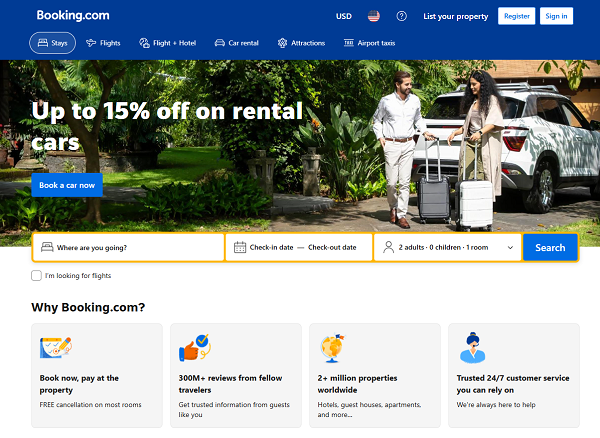
Booking.com offers publicly available data for various use cases, such as:
Price Monitoring & Comparison: Track fluctuations in hotel pricing to optimize competitive pricing in your travel or hotel app.
Market Research: Gather data on hotel availability in specific regions for business intelligence and decision-making.
Review Aggregation: Collect user feedback to improve recommendation systems and analyze customer sentiment.
Competitor Analysis: Compare listings across different cities or countries without manually browsing through hundreds of pages.
Common data fields include:
Booking.com implements several strategies to prevent scraping, prepare for the following common challenges:
| Challenge | Description | Solution |
| Dynamic Content (JS) | Pages load via JavaScript, requiring rendering tools. | Use Playwright/Selenium or GraphQL APIs. |
| CAPTCHA & Bot Detection | Human verification blocks automation. | Rotate residential proxies and integrate solvers if needed. |
| IP Blocking | Bans from excessive requests. | Use rotating proxies with rate limiting. |
| Geo-Restrictions | Content varies by location. | Geo-targeted proxies for regional access. |
Address these with rotating proxies (e.g., from services like GoProxy) and human-like behavior.
Before you begin scraping, start with the basics to ensure a smooth setup.
Install Python 3.12+ from python.org.
Open your terminal and run:
python -m venv scraper_env
Then activate it:
pip install requests beautifulsoup4 httpx selenium
# optional: playwright
pip install playwright
playwright install
Checkpoint: python --version returns 3.12+ and pip show requests works.
Before proceeding to more complex tasks, start without proxies to confirm you can fetch a page and see the expected HTML.
Example Code:
import requests
from bs4 import BeautifulSoup
url = "https://www.booking.com/searchresults.html?ss=Paris"
headers = {
"User-Agent": "Mozilla/5.0 (Windows NT 10.0; Win64; x64) AppleWebKit/537.36 "
"(KHTML, like Gecko) Chrome/120.0.0.0 Safari/537.36",
"Accept-Language": "en-US,en;q=0.9"
}
r = requests.get(url, headers=headers, timeout=15)
print(r.status_code)
soup = BeautifulSoup(r.text, "html.parser")
print(soup.title.string if soup.title else "No title — possibly blocked")
To avoid being blocked, rotate IPs so each request looks like a distinct human visitor. Use geo-targeting rotating residential to improve anonymity and access local prices.
Tip: If blocked on Step 2, or before scaling to many requests.
Create a GoProxy account and get credentials(7-day residential free trial for your worry-free purchase, test before scaling).
proxy = "http://username:[email protected]:port"
proxies = {"http": proxy, "https": proxy}
r = requests.get(url, headers=headers, proxies=proxies, timeout=15)
import asyncio, httpx
from itertools import cycle
proxies = ["http://u:p@ip1:port", "http://u:p@ip2:port"] # from GoProxy
proxy_cycle = cycle(proxies)
async def fetch(client, url):
proxy = next(proxy_cycle)
return await client.get(url, headers={"User-Agent":"..."}, proxies={"http:/": proxy, "https:/": proxy})
async def main(urls):
async with httpx.AsyncClient(http2=True, timeout=20) as client:
return await asyncio.gather(*(fetch(client, u) for u in urls))
Checkpoint: Repeat Step 2 with proxies. If still blocked, try a different proxy or add more headers/session realism.
Use browser dev tools (F12) → Network → XHR/Fetch. Prefer GraphQL for stability.
Use robots.txt sitemaps for URL discovery.
Checkpoint: Identify one GraphQL request with JSON data.
Based on Step 3 for robust defenses:
Always set User-Agent, Accept-Language, Referer, Accept-Encoding. Reuse cookies for a short session per proxy to mimic a user session.
headers = {
"User-Agent": "Mozilla/5.0 ...",
"Accept-Language": "en-US,en;q=0.9",
"Referer": "https://www.booking.com"
}
Start with 0.2–1 requests/second per IP. These are safe starting heuristics. Add random jitter: sleep(random.uniform(1, 3)) or token/bucket rate limiter.
Prefer proxies that reduce CAPTCHA frequency (GoProxy can help). If CAPTCHA appears, options: rotate proxy, pause and retry with backoff, or integrate a solver.
Use a safe_get helper to handle transient 429/503/403 patterns:
import time, random, requests
def safe_get(url, headers, proxies, max_retries=5):
backoff = 1
for attempt in range(max_retries):
resp = requests.get(url, headers=headers, proxies=proxies, timeout=15)
if resp.status_code == 200:
return resp
if resp.status_code in (403, 429, 503):
time.sleep(backoff + random.uniform(0, backoff))
backoff *= 2
continue
resp.raise_for_status()
raise Exception("Max retries exceeded").
Checkpoint: Run 10 test requests using your rate limit and proxies; success rate should be high (aim >95%).

Beginner Path: Requests + BeautifulSoup.
Pro Path: Playwright for JS, GraphQL for efficiency.
resp = requests.get("https://www.booking.com/searchresults.html?ss=Paris", headers=headers, proxies=proxies)
soup = BeautifulSoup(resp.text, "html.parser")
hotels = soup.select('[data-testid="property-card"]')
for h in hotels[:5]:
name = h.select_one('[data-testid="title"]').get_text(strip=True) if h.select_one('[data-testid="title"]') else None
price = h.select_one('[data-testid="price-and-discounted-price"]').get_text(strip=True) if h.select_one('[data-testid="price-and-discounted-price"]') else None
link = h.select_one('a[href]')['href'] if h.select_one('a[href]') else None
print(name, price, link)
Pagination example
base = "https://www.booking.com/searchresults.html"
for offset in range(0, 100, 25):
resp = requests.get(base, params={"ss":"Paris","offset":offset}, headers=headers, proxies=proxies)
# parse as above
Checkpoint: Extract 5 hotels and follow one detail page successfully.
detail_url = "https://www.booking.com/hotel/us/example.html"
r = safe_get(detail_url, headers, proxies)
soup = BeautifulSoup(r.text, "html.parser")
title = soup.select_one('#hp_hotel_name').get_text(strip=True) if soup.select_one('#hp_hotel_name') else None
address = soup.select_one('.hp_address_subtitle').get_text(strip=True) if soup.select_one('.hp_address_subtitle') else None
amenities = [li.get_text(strip=True) for li in soup.select('[data-capla-component*=FacilitiesBlock] li')]
latlng = soup.select_one('[data-atlas-latlng]')['data-atlas-latlng'] if soup.select_one('[data-atlas-latlng]') else None
Checkpoint: Parse title, address, and at least one amenity for 2 sample hotels.
Extract CSRF:
import re
import json
# After response
csrf_match = re.search(r"b_csrf_token: '([^']+)'", response.text)
csrf = csrf_match.group(1) if csrf_match else ""
payload = {
"operationName": "AvailabilityCalendar",
"variables": {
"hotelId": "example", # From URL
"checkIn": "2025-11-01",
"checkOut": "2025-11-05"
# Add more from dev tools
}
}
headers.update({"X-CSRF-Token": csrf})
api_resp = requests.post("https://www.booking.com/dml/graphql", json=payload, headers=headers, proxies=proxies)
data = api_resp.json()
# Parse: data['data']['availability']['avgPriceFormatted']
Checkpoint: Fetch and parse price for one hotel.
hotel_id = "hotel/us/example"
rev_url = f"https://www.booking.com/reviewlist.html?pagename=hotel/fr/tour-eiffel&type=total&sort=f_recent_desc&rows=25&offset=0"
soup = BeautifulSoup(safe_get(rev_url, headers, proxies).text, "html.parser")
reviews = soup.select('.c-review-block')
for rev in reviews:
score = rev.select_one('.bui-review-score__badge').text.strip() if rev.select_one('.bui-review-score__badge') else "N/A"
text = rev.select_one('.c-review__body').text.strip() if rev.select_one('.c-review__body') else "N/A"
For JS-heavy pages:
from playwright.async_api import async_playwright
async def scrape_dynamic(url):
async with async_playwright() as p:
browser = await p.chromium.launch(headless=True)
page = await browser.new_page()
await page.goto(url)
content = await page.inner_html('body')
await browser.close()
return content # Parse with BeautifulSoup
Checkpoint: Fetch 10 pages concurrently with <5% errors.
import csv
# hotels from scraping
with open('hotels.csv', 'w', newline='', encoding='utf-8') as f:
writer = csv.DictWriter(f, fieldnames=['name', 'price', 'reviews'])
writer.writeheader()
writer.writerows(hotels)
Clean: Handle N/A with if-else. Pro: Use Pandas for analysis/missing data.
Checkpoint: Create CSV with 50 rows for one city.
Monitor: Track success rate, latency, 403s; use Prometheus for pros.
Canary Tests: Hourly selector validation.
Change Management: Store raw responses; update selectors weekly.
Defaults: 0.2 req/sec per IP; scale after stable runs.
Split Jobs: By date/city.
Tools: Scrapy/Celery for queues; ScrapeGraphAI for low-code alternatives.
This guide equips you for ethical Booking.com scraping, with proxies and GraphQL for efficiency. Test incrementally, adapt selectors (inspect live site), and prioritize responsibility. For advanced, explore Playwright.
Look for reliable rotating residential proxies? Try GoProxy’s trial to test scraping booking.com. Sign up and get it today!
< Previous
Next >


 Cancel anytime No credit card required