Web scraping lets you automatically collect data from websites without manual copying. When you need speed, near-zero memory overhead, and familiar jQuery-style syntax, Cheerio is still one of the fastest and most reliable tools for web scraping with Cheerio in Node.js in 2026.
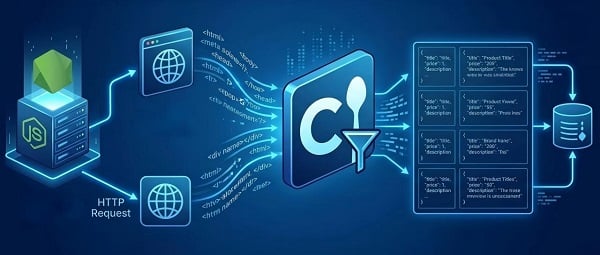
This guide takes you from zero to a working scraper, then shows exactly how to handle modern dynamic sites, debug failures, clean data, and scale responsibly.
Should You Use Cheerio?
Why choose Cheerio
- Lightning-fast parsing with almost zero overhead
- Familiar API: .text(), .attr(), .find(), .each()
- Works with any HTTP client (Axios, undici, fetch, etc.)
- Perfect for static or server-rendered pages
Key limitation: Cheerio only sees the raw HTML the server returns. Client-side JavaScript content will be missing.
Solution: Render first with Puppeteer/Playwright, then hand the HTML to Cheerio.
Quick decision checklist before coding
1. Press Ctrl+U (view source). If your target data is already in the HTML → Use Cheerio only.
2. Open DevTools → Network tab → filter XHR/Fetch. If you see clean JSON endpoints → Call the API directly (best option).
3. No API + content injected by JS → Render + Cheerio.
One-line test:
curl -s "https://quotes.toscrape.com" | grep -E 'class="quote"'
Diagnostic summary
Use Cheerio for server-rendered HTML. For heavy SPAs, prefer JSON APIs or render-then-parse.
Prerequisites & Quick Setup
- Basic JavaScript knowledge
- Node.js v18+ (v1.2.0+ of Cheerio requires 18.17+)
- VS Code
mkdir cheerio-scraper && cd cheerio-scraper
npm init -y
npm install axios cheerio
# Optional modern alternatives
npm install undici puppeteer
Fetch tip (lower overhead than Axios):
const { request } = require('undici');
async function fetchHtml(url) {
const { body } = await request(url, { headers: { 'user-agent': '...' } });
return await body.text();
}
Core Cheerio Methods You’ll Use Every Day
cheerio.load(html)
$(selector)
.text().trim() / .attr() / .find() / .each()
.html() — inspect raw output
Cleaning helpers:
const cleanText = s => String(s || '').replace(/\s+/g, ' ').trim();
const cleanPrice = s => parseFloat(String(s || '').replace(/[^\d.]/g, '')) || null;
Step 1. Find the Right Selectors
1. Open page in Chrome → right-click → Inspect.
2. Copy selector → test with $(selector).html().
Selector toolkit
Attribute: $('div[data-id="product"]')
Has/contains: $('.card:has(.price)')
Fallback order: data-* → id → unique class
Pro tip: Always run $(selector).html() or $.html() when selectors break — it instantly shows whether content is server-rendered or missing.
Step 2. Build Your First Static Scraper
Single-page extraction
// scraper-static.js
const axios = require('axios');
const cheerio = require('cheerio');
const fs = require('fs/promises');
async function fetchHtml(url) {
const res = await axios.get(url, {
headers: { 'User-Agent': 'Mozilla/5.0 (compatible; my-scraper/1.0)' },
timeout: 15000
});
return res.data;
}
function parseQuotes($) {
const quotes = [];
$('.quote').each((_, el) => {
const text = $(el).find('.text').text().trim();
const author = $(el).find('.author').text().trim();
const tags = $(el).find('.tags a').map((i, tag) => $(tag).text().trim()).get();
quotes.push({ text, author, tags });
});
return quotes;
}
async function main() {
const html = await fetchHtml('https://quotes.toscrape.com/');
const $ = cheerio.load(html);
const quotes = parseQuotes($);
await fs.writeFile('quotes.json', JSON.stringify(quotes, null, 2));
console.log(`Saved ${quotes.length} quotes`);
}
main().catch(console.error);
Pagination with “Next” Links
async function scrapePaged(startUrl) {
let url = startUrl;
const results = [];
while (url) {
const html = await fetchHtml(url);
const $ = cheerio.load(html);
results.push(...parseQuotes($));
const next = $('a.next').attr('href');
url = next ? new URL(next, url).toString() : null;
await waitRandom(600, 1400);
}
return results;
}
function waitRandom(min, max) {
return new Promise(r => setTimeout(r, Math.random() * (max - min) + min));
}
Infinite scroll / XHR pattern
Inspect DevTools → Network → XHR while scrolling. Replicate JSON endpoints — faster and more stable.
Step 3. Dynamic Sites: API First or Render + Parse
Always prefer a JSON API found in DevTools.
If none is available, use a headless renderer and hand the resulting HTML to Cheerio:
// dynamic.js
const puppeteer = require('puppeteer');
const cheerio = require('cheerio');
async function scrapeDynamic(url) {
const browser = await puppeteer.launch({ headless: true });
const page = await browser.newPage();
await page.goto(url, { waitUntil: 'networkidle2' }); // networkidle2 works well for most SPAs but test and tune if needed
const html = await page.content();
await browser.close();
const $ = cheerio.load(html);
return parseQuotes($); // reuse your parser!
}
Pro tips:
Cache rendered HTML snapshots (S3/Redis) to avoid repeated expensive rendering.
networkidle2 waits until there are at most 2 network connections for ~500 ms.
Step 4. Authentication & Persistent Session
Two common approaches:
1. Headless login → cookie bridge (recommended): Login once in Puppeteer, export cookies, then reuse them in Axios/undici headers. Avoids re-rendering the login step every run.
2. Replicate login POST: Mimic the exact POST request with CSRF tokens (copy the sequence from DevTools).
Note: CAPTCHA, 2FA, and aggressive anti-bot systems may require manual intervention or specialized services. Always follow legal/ToS boundaries.
Step 5. Make It Production-Ready
Retries, exponential backoff & timeouts
async function retry(fn, retries = 3, baseDelay = 500) {
for (let i = 0; i < retries; i++) {
try { return await fn(); }
catch (err) {
const status = err.response?.status;
if (status && status >= 400 && status < 500) throw err;
if (i === retries - 1) throw err;
await new Promise(r => setTimeout(r, baseDelay * Math.pow(2, i)));
}
}
}
Proxies & anti-bot protection
Use when you see 429/403.
- Datacenter: cheap but easier to detect
- Residential: better reputation
Advanced detection (TLS JA3, header order, fingerprinting) can still flag simple rotations. For high-volume work, consider a managed residential proxy service to handle rotation, geo-targeting, and fingerprint mitigation out of the box. For built-in proxy support without external services, consider Crawlee’s CheerioCrawler.
Concurrency limits & polite scraping
Use p-limit(5) to cap concurrent requests
Add randomized delays (500–1500 ms)
Golden rule: ≤ 1 request per second per domain unless you have explicit permission
Step 6. Testing, CI/CD & Monitoring
Save raw HTML fixtures and test your parser:
// parse.test.js (Jest)
const fs = require('fs');
const cheerio = require('cheerio');
const { parseQuotes } = require('./scraper-static');
test('parse quotes page', () => {
const html = fs.readFileSync('__fixtures__/quotes.html', 'utf8');
const $ = cheerio.load(html);
const data = parseQuotes($);
expect(Array.isArray(data)).toBe(true);
expect(data.length).toBeGreaterThan(0);
expect(data[0]).toHaveProperty('text');
});
Add hourly/daily smoke tests on your main branch to detect schema changes early (e.g., result count drops to zero).
Step 7. Scaling to Thousands of Pages
- Small: single script + cron
- Medium: queue (BullMQ/RabbitMQ) + worker pool + proxy pool
- Large: autoscaled workers, headless clusters, distributed proxy manager
Recommendation: When you outgrow manual orchestration, switch to Crawlee (CheerioCrawler) — it handles concurrency, retries, proxies, and queueing out of the box.
Troubleshooting Common Issues
1. Empty results — Usually caused by client-side rendering. Fix: check DevTools network for APIs or render then parse.
2. 403/429 — Use realistic headers, rotate residential proxies, add delays for better success rates.
3. Selectors break after a site update — Run $(selector).html() to inspect what's actually returned. Rebuild selectors using stable attributes.
4. Slow renders/costs — Cache rendered HTML snapshots and reduce headless browser runs.
Best Practices & Responsible Scraping
Always check robots.txt and the site’s Terms of Service
Never overload servers
Store data in structured JSON first
Version your scrapers — websites change
FAQs
Q: Can Cheerio execute JavaScript?
A: No — Cheerio parses static HTML strings. For JavaScript-rendered pages, render the DOM with a headless browser, then pass HTML to Cheerio.
Q: Is calling an API better than scraping HTML?
A: Yes — when available, APIs are faster and more stable. Prefer them when possible.
Q: How do I handle pagination?
A: Use next links for simple pagination; replicate XHR endpoints for infinite scroll.
Q: Is scraping legal?
A: It depends — check robots.txt, Terms of Service, and local laws. Avoid scraping personal or sensitive data without permission.
Final Thoughts
Start with the tiny static example above. If DevTools shows JSON endpoints — call them directly. If not, render with Puppeteer/Playwright, cache the snapshot, and let Cheerio handle the extraction. For production, combine retries, proxy rotation, concurrency limits, fixtures, and scheduled smoke tests — or use a crawler framework like Crawlee to avoid reinventing the orchestration layer.



